Throw a rock in any bookstore or library and you’ll probably hit a book about productivity. Google “productivity” or “time management” and you’ll get further into a rabbit hole than Alice. I LOVE this stuff so I’ve read dozens of books and subscribe to blogs and newsletters on this topic and the opinions and tools are as diverse as the authors.
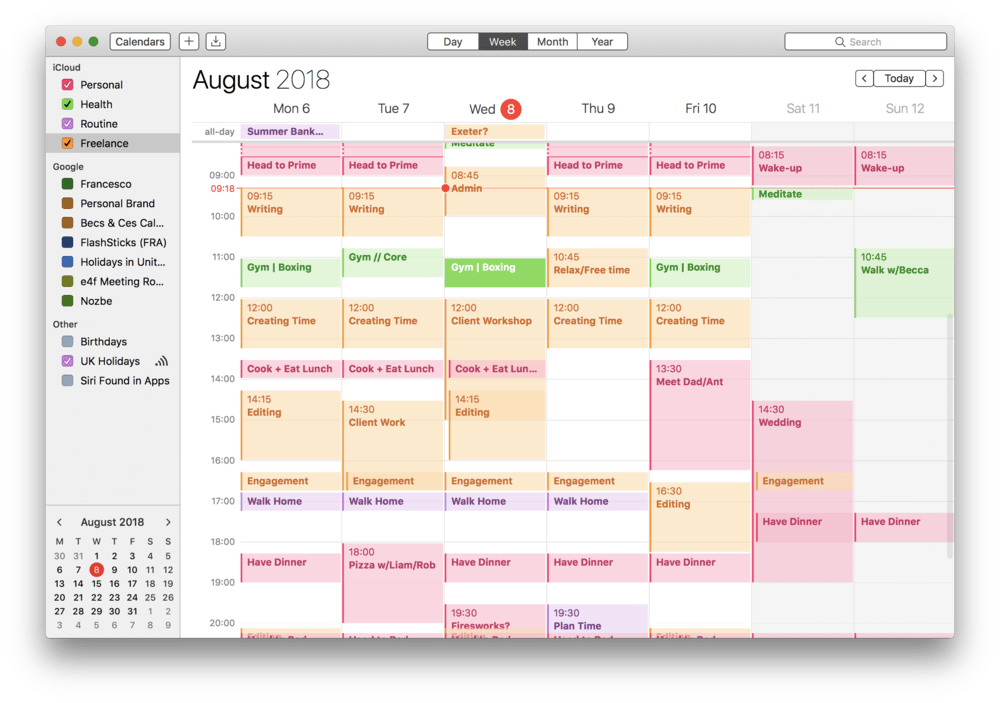
I’ve tried a lot of the software, tools, and systems and while I use several, there’s one that has completely upped my productivity game: Time Blocking. This is where you block off sections of your calendar to work on specific areas. For example, you add an event to your calendar from 9-10 a.m. every Tuesday and Thursday for “social media”. During this time, you ONLY work on the social media tasks you’ve prioritized such as creating great content with Canva, scheduling posts, or checking analytics.
I have time blocked off for client work, my Facebook page, contributing to Facebook groups, writing, team meetings, social media, personal tasks, etc. There’s time built in for breaks and lunch and the daily crossword but each day is pretty well scheduled. That may sound constricting but it’s the opposite – it’s freeing because you don’t have to think about the task until you get to that section.
Try time blocking if you…
- Juggle many different projects/responsibilities
- Spend too much time in “reactive mode”, responding to email and messages
- Find your day chopped up by meetings
- Battle constant interruptions throughout the day
- Struggle to find the time and mental space for big-picture thinking or just eat lunch
Set up time blocking for one week and commit to absolutely sticking to the schedule. Don’t cheat. Set calendar reminders for 10 minutes before the next block and when the calendar gets there, stop whatever you’re doing and move to the next block. If you’ve left something unfinished, it will be a good lesson in time management and if necessary you can pick it up in the “Flex Time” block that you’ve wisely setup near the end of the day.
Productivity awaits!
p.s. Don’t throw rocks indoors.
Want to get great content – and much more – delivered right to your inbox every two weeks? Join the Email List